In-Game Chat: Key Features and Implementation Guide
Keep players talking without leaving the game. Learn what in-game chat is, must-have text and voice features, moderation basics, and how you can implement it for better retention.



Ask any multiplayer team why they “fell off” a game and you’ll hear a fairly familiar theme: it became harder to play together, often because someone had to jump to Discord mid-session.
A group of friends just wanted to get on the game after work, but now they’re explaining to each other how to make an account on a third-party app and fiddle around with it mid-game. An in-game chat keeps communication attached to the match and party, inside your product.
This article should give you a feature checklist and a build/SDK/WebView decision guide. Let's get going.
What Is In-Game Chat?
In-game chat is the communication layer built inside the game client (and backed by servers) so players can actually talk while they’re in the lobby, matchmaking, spectating, or just actively playing.
Now, this can be in text or voice (even both!), but the defining trait here is context: the game knows who’s speaking and what session they’re in.
That’s different from “chatting about the game” in third-party chat apps like Discord, especially when the players will be bouncing between two chat apps for different friend groups. Those tools can be great for the community, but they’re usually pretty disconnected from in-session events unless you build deep integrations.
For example, in a friend group, two players might be on PC, and the other is on console. The PC players can log into Discord, but the guy on console can’t (directly from their console). They’d then have to use another device like a phone or laptop, but now they won’t be able to hear the game audio and their friends at the same time.
In-Game Chat Types
We can see a few patterns show up over and over in successful titles
Team Chat: More of a match-scoped channel to help the players stay coordinated—it’s typically just a small overlay.
Party Chat: A persistent channel for a pre-made group for them to chat in, whether about the game or more candidly.
Clan/Guild Chat: These are long-lived channels where the players all have roles. A lot more holistic than just a lobby chat.
Lobby/Matchmaking Chat: Temporary chat that they use while they’re in a queue.
Private Messages: 1:1 messages that persist between sessions.
Read about the best in-game chat examples
Why You Need to Keep Communication In-House
The business case for you to focus on here isn’t “players like chat.” It’s that communication is literally a multiplier for time spent together, and multiplayer games are increasingly social at scale. For example:
The Entertainment Software Association reports 190.6 million Americans play games; 61% play weekly, 74% play with others, and 88% have played online.
Newzoo estimates 3.6 billion players and $188.8 billion in 2025 game revenues worldwide.
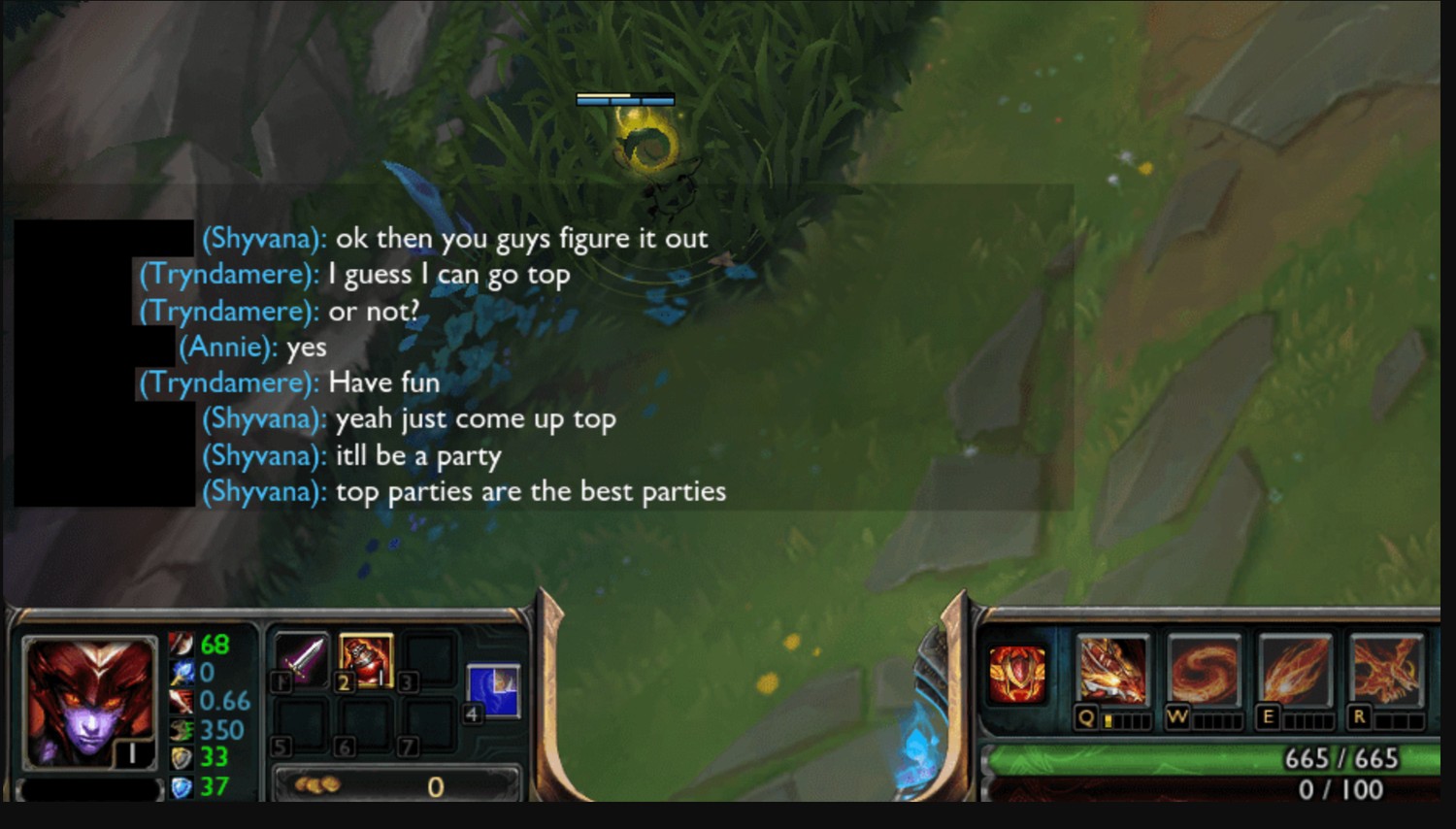
The Downside of Relying on External Chat
Even though Discord is widely used (reporting puts its monthly active user count at around 200 million), it still presents a separate identity and settings surface. On new-gen consoles, it’s more convenient than it used to be, but it’s still a workflow (for example, how PS5 users start Discord voice chats from the control center).
But when players communicate off-platform:
- Your Retention Takes a Hit: Session flow breaks when people leave to manage comms, invites, or roles. It’s a hassle for players to fiddle with audio levels so they can hear the game and their friends at clear levels.
- You Lose First-Party Data: You can’t tie conversation to in-game context for personalisation or offers without building a complicated bridge.
If your co-op loop depends on coordination, and the fastest way to coordinate is outside your game, your core loop is renting critical UX from someone else. And that’s a key problem.
In-Game Chat Features: Text, Voice, and Moderation
Any good modern stack is doing three things at once: communication, social state, and safety. Here’s what matters most.
Real-Time In-Game Text Chat & Multimedia
Text is the default for many players: it works in noisy environments, and it’s accessible (not everyone has a mic or feels comfortable speaking). At minimum, ship:
Channels (team/party/guild) and private messages
Reactions/GIFs and lightweight media
Sensible limits and safe rendering
Now, the hard part here is not UI—it’s latency and delivery. For in-game text chat, even small delays add up fast when players are coordinating in seconds. They don’t care how it works, just that it does work. Their messages need to arrive fast and reliably across shaky networks.
A tip here would be to treat text channels like “lightweight chat rooms” with explicit lifetimes (match-scoped vs persistent). You’d even do the same for social hubs by separating “global” chat rooms from high-signal team channels.
Text vs Voice: When Each Works Best
Ideally, you’re looking to match communication to player context, so it’s not about choosing between text and voice and doing away with the other.
Text chat is ideal when players can’t use a mic (shared spaces, noisy environments, etc.), and it’s a lot easier to moderate and archive. It’s also a lot better in terms of coordination - a quick “gg” or “defuse A” that stays around after a match.
Voice chat, on the other hand, shines more in fast-paced moments where typing is too slow (tactical shooters or battle royals, for example), and it’s better for social bonding because of the whole tone and timing that comes with the emotion involved.
So, the best approach is to offer both, then let the players control the experience with per-mode settings like push-to-talk or party-only voice.
In-Game Voice Chat & Video Chat Integration
Voice is why co-op feels like hanging out instead of sending pings. For quality, delay targets matter. For example, ITU-T’s G.114 guidance is to keep the “mouth-to-ear” delay below about 150 ms, because that’s what makes interactivity essentially transparent for most applications.
In a game, that would translate to a rule like: if their voice lags behind what’s happening on screen, players will stop trusting it. So, if you’re adding in-game voice chat on mobile, plan for some aggressive jitter buffering and fast reconnects when networks switch.
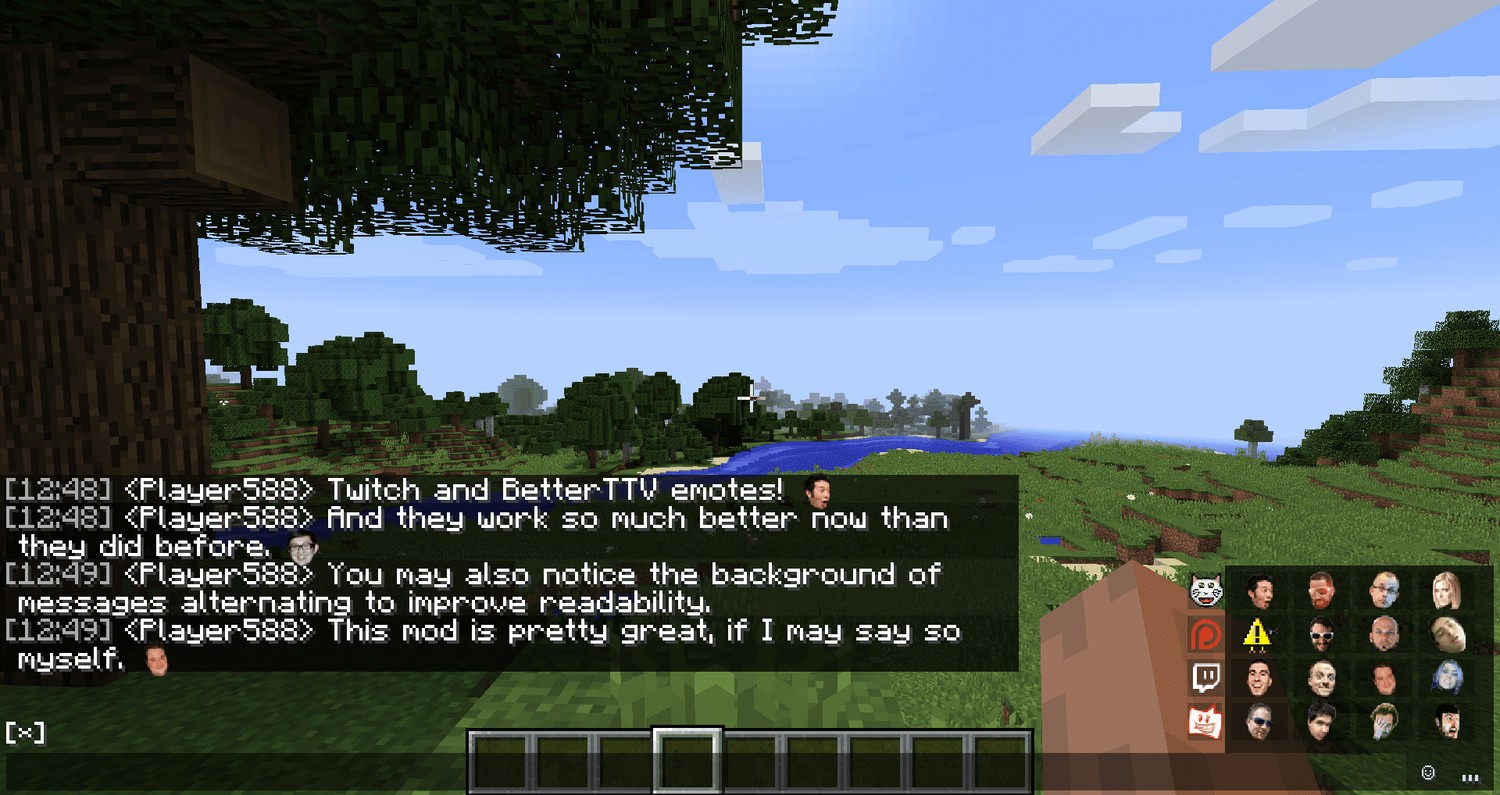
Where does video chat belong? It’s not for every title, but video chat can work for:
Gaming watch parties / co-viewing inside a game hub
Creator-led lobbies and spectator experiences
In-Game Chat Moderation
You can’t bolt safety on later. Even the Anti-Defamation League (ADL) talks about how voice is a major venue for hate and harassment, and its surveys show that harassment is common. That’s especially because it’s seen as anonymous on the offender’s end. If you played games like Call of Duty: MW2 back in the day, you know that first-hand.
So, your most effective approach is a layered one, and a good chat moderation program documents what you enforce and why.
Player Controls (Must-Have)
- Mute, block, report
- Per-channel settings (team vs party vs guild)
- “Safe defaults” for new players and minors
Read more about community moderation tools
Automation
- Profanity + spam filters for text
- Rate limits and anomaly detection (flooding, copy-paste spam)
- Voice analysis when appropriate (with clear disclosure and opt-outs)
As we mentioned, Call of Duty used to (and still sometimes does) have a real problem with this, so Activision rolled out AI-supported voice moderation in Call of Duty, publishing progress updates and explaining how players can disable voice in settings.
Human Tools
- Review queues, audit logs, and consistent enforcement rules
- Appeals and escalation paths for your more edge cases
Compliance matters too! The Federal Trade Commission (FTC)’s COPPA rule covers online services directed to children under 13 (or with actual knowledge they collect personal info from a child under 13).
It’s also worth noting that platforms with massive youth audiences publish their safety approaches. Roblox, for example, shares transparency resources and safety system updates, including voice safety work.
Presence, Status, and Social Layer
Messaging alone doesn’t create community. The “social layer” is what turns a channel into a place players return to, so you’ll want to prioritise:
Presence (online/offline, in match/in lobby)
Friends list, invites, and parties
Roles and lightweight activity (LFG, joinable states)
Performance and Reliability
Players only care that the chat works. It makes your job a bit easier, since you know what your requirements are:
No lost messages (with retries and sensible ordering)
Minimal latency under normal load
Spike tolerance for launches and events
Consistent behaviour across platforms
How to Implement In-Game Chat: Build vs SDK vs WebView
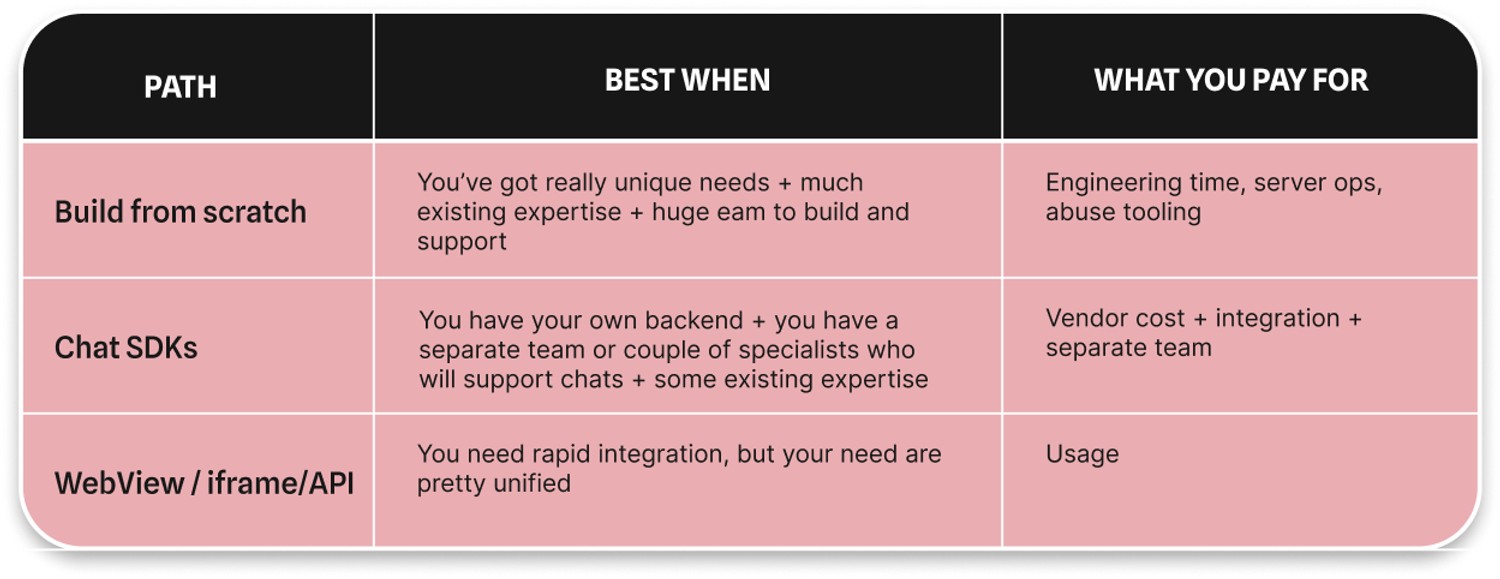
1. The Traditional Route: Building from Scratch
Pros: Full control of UX, data, and customisation.
Cons: You own everything that makes chat hard, including things like scaling, security, and abuse response. If you’re going to go down this route, you’ll want to budget for ongoing operations and a dedicated safety roadmap, not just “version 1.2.
2. Using Chat SDKs
This is the common “ship fast” path: integrate a service so you can focus your engineering effort on game-specific UX (controller input, overlay behaviour, identity). However, it can be an illusion of the speed: SDK required constant releases synchronisation for all platforms.
3. WebView/API/iFrame
The quickest option: chat integration requires time for UX architecting. Still, social tools released do not depend on main product releases, and users on all devices get updates simultaneously.
The basic idea here is that you can embed a full chat UI inside the client and drive it with tokens from your backend. The risk is edge cases (keyboard, controller focus, safe areas, reconnect logic).
Performance & Overlay UX
A chat UI should never feel like it’s fighting the game, so you ideally want:
- One-button toggle and quick reply or shortcuts for commands
- Clear “reconnecting” states instead of silent failures that annoy your users
- Audio controls that are reachable in two steps
- Minimal HUD footprint
- Cross-Platform Support
- Cross-platform groups are pretty common nowadays: touch, keyboard, and controller. Fortunately, WebView-style UI can unify the presentation across mobile and web clients, so you’re actually maximising the number of people playing.
Beyond Messaging: Turning Chat into a Community
Once you’ve got the bulk of the work out of the way and you’ve made the chat layer stable, you can now think about building up into community features: events, discussions, clip sharing, and creator-led spaces. Gaming communities are the most sticky, and tie your users to the games even after finishing. Communities allow you to attract new users due to word of mouth and retain users not just when they play, but when they communicate and observe their mates' gaming experience. Thus, at the end, social tools allow you to have your own Twitch inside your game, with all of this engagement.
Read our guide on how to build in-app and in-game community
Key Takeaways on In-Game Chat
Before we wrap up, take a look at some of the key points we talked about:
- Keeping communication inside your product reduces friction and supports retention.
- Must-haves: reliable text, voice where it fits, and layered safety (player controls + automation + human review).
- Presence is your bridge between messaging and community.
- Choose architecture based on constraints: build, SDK/API, or embedded UI, and plan for long-term operations either way.
Build Your In-Game Community with Watchers
Please get in touch with us if you'd like to integrate in-app community chats with the high-level moderation system into your website, app, or game. We'll be happy to help you find the best solution.
FAQs About In-Game Chat
What does in-game chat mean?
In-game chat is communication that’s been built into the game so players can message or talk without leaving the client.
What is the in-game chat feature?
The in-game chat feature refers to a set of tools - channels, private messaging, voice, presence, and safety controls - that support real-time game communication for all players.
How to build in-game chat?
Build in-game chat by defining your channel model (team/party/guild), integrating identity/auth, and then designing moderation workflows. Lastly, pick an implementation path (build, SDK/API, or embedded UI).
What is the best voice quality for in-game chat?
Prioritise low delay and stability for high in-game chat voice quality. You’re ideally keeping mouth-to-ear latency under ~150 ms for natural conversation.
References
- Essential Facts 2024 | ESA
- Global Games Market Report 2025 | Newzoo
- Business of Apps - Discord monthly users | Business of Apps
- ADL - research on harassment in online games. | ADL
- ITU-T - Recommendation G.114 (voice delay guidance) | ITU
- FTC COPPA Review Guidelines | Federal Trade Commission
- Call of Duty - voice moderation rollout (progress report + FAQ + coverage) | callofduty.com
- Roblox - transparency and safety updates | Roblox
- Talking, Teaming, and Thriving: How In-Game Chats Affect Players’ Experience | Watchers blog
Boost your platform with
Watchers embedded tools for ultimate engagement


